
1. Upload one photo
Upload a clear photo of yourself, a friend (with permission), or your pet. Keep the face visible, and use the hair and outfit you want in the video.
Jump into the viral TikTok trend inspired by Desiigner's hit rap song "Panda"! Upload one photo. Become the star of the Panda trend. No prompts, no editing skills required.
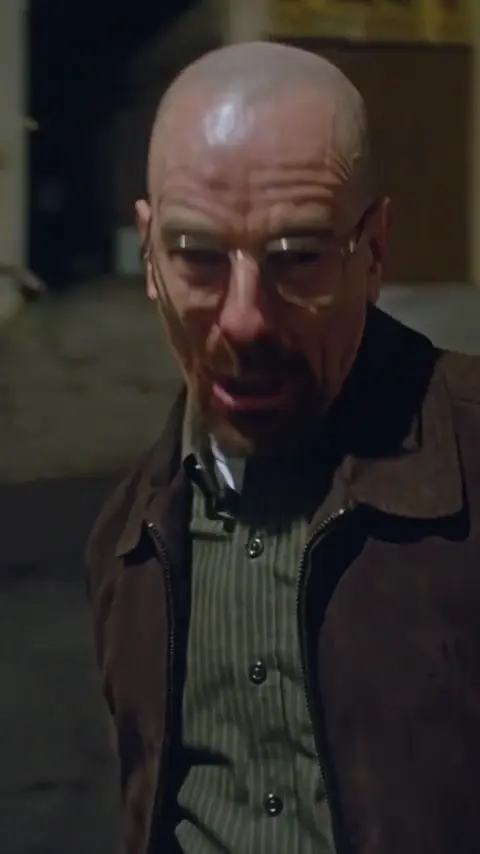
Not a panda animal video! This AI video trend is inspired by Desiigner's hit rap song "Panda". Upload a photo and recreate the iconic rap performance with your own character.
“Panda” is a song by American rapper Desiigner, first released on December 15, 2015.
Fans of “Panda” have turned its rap performance into a character-remix trend, putting familiar faces, fictional characters, friends, and even pets into the same scene. The fun is in the contrast: the head turns, hand gestures, and lip sync stay familiar, while an unexpected new star makes each version its own.
This 10-second example follows a performer in glasses and a brown coat on a dim street. The camera stays close. Here is what happens, in order.
The clip opens on the performer mid-line, close to the camera. He leans his head toward the lens.
He lifts his head, turns, and throws it back. The camera moves with him and briefly shows the street and lit storefronts behind his shoulder.
With his chin raised, he keeps lip-syncing, then sweeps a hand across the foreground. The brown coat, green shirt, and glasses stay easy to recognize.
He leans back, looks up, and brings a finger beside his cheek. The close framing keeps the expression and gesture in view.
He lowers his head again, then looks up and raises an open hand beside his face to finish the 10-second performance.
Get the familiar performance from one photo. The timing and scene are already prepared for you.
AI results can vary with the photo. A clear, well-lit face helps keep identity, expressions, and lip sync on track.
The template follows the reference framing, camera movement, head turns, and gestures in the same order. You choose the character; the template supplies the performance.
Your photo sets the face, hair, and clothing for the whole clip, helping the character stay recognizable as expressions change.
Lip movements follow the prepared audio, and poses follow the motion reference. The performance is generated as one clip with sound.
Download a 10-second MP4 in portrait or landscape and share it. You do not need to build an editing timeline first.
Create in your browser: upload a photo, choose your settings, and generate. No app to install, no prompt to write, and no reference clips to edit.
Use welcome credits for an eligible preview, then buy credit packs if you need more. A subscription is optional, and we do not add a watermark to your download.
Upload a clear photo of yourself, a friend (with permission), or your pet. Keep the face visible, and use the hair and outfit you want in the video.
Choose Standard 480p or HD 720p, then portrait 9:16 or landscape 16:9. The full video is 10 seconds with sound. Check the credit cost and generate.
Preview the finished video, download the MP4, and post it to TikTok, Instagram Reels, YouTube Shorts, or any platform that accepts MP4.
Use a sharp, well-lit photo with one main subject and a clearly visible face. Avoid heavy blur, face coverings, and very distant shots. JPG, PNG, and WebP are supported, up to 10 MB, with sides from 300 to 6000 pixels. Your photo guides the face, hair, and outfit.
A full 10-second video costs 100 credits for Standard 480p or 200 credits for HD 720p. A 2-second Standard preview uses 10 credits. You can buy one-time credit packs without a subscription, and pack credits do not expire. The editor shows the cost before you generate.
Yes. Eligible new accounts receive 10 welcome credits once per account and IP address, enough for a 2-second Standard preview at 480p. No card is needed. One preview is shared across video templates on the same account and network, and daily availability can vary.
Yes, if you have permission to use the photo and that person’s likeness. Ask before you upload or share. Do not use unauthorized portraits, impersonate someone, or imply their endorsement.
Yes. Upload a clear photo of one dog or cat with its face visible. Your pet becomes the character in the Panda performance. The movements come from a human reference, so results can vary.
Credits are returned when a generation is confirmed as failed or canceled. Only upload photos and likenesses you have permission to use. If you still need help, email support@boppop.app with your task ID and a short description of the issue. If we confirm a product bug affected the generation, we will refund those credits and add the same amount as bonus credits.
Explore another meme: Tiny Desk outStanding · Bad Times · Baby Wow · Ballon d’Or Filter · Ozil Goal · Burning Bridges · Tip Toeing in My Jordans · NightWing.